
The Basics (continued)
Variables
Variables are containers that hold something of value. You give the container a name so that you can retrieve it for later use. Variables can be declared anytime, anywhere, in your scripts. They can be created as global variables, which means they are available from anywhere in the script, or they can be created as local variables which have meaning only in a very narrow set of circumstances. Variables are created using the "var" keyword.
Variables can contain lots of different kinds of data. Here are just a few:
Numbers: Numbers can be whole numbers or decimals, or an expression that resolves to a number such as (a+b)/c. Here are some examples:
var wholeNumber = 5;
var floatingPointDecimal = 3.14;
var expression = (5/9) * 100;Strings: Any letter or cluster of characters, forming words or not, or an expression that resolves to words. Strings are always enclosed in quotations. Here are some examples:
var studentName = "Alex";
var date = "May 5, 1997";
var address = "335" + "Creighton Rd.";Booleans: Binaries, true or false. Here are some examples:
var musicIsPlaying = true;
var petIsHungry = false;
Functions
Functions are reusable blocks of instructions that can be called again and again by name. Like variables, they return something of value. There are lots of pre-written functions. By calling the name of the function, you trigger a block of code to execute. Object methods are functions. The alert() function is a good example of a pre-written function.
Functions allow the developer to break their code into small "chunks" that are targeted to accomplish a particular task. These chunks can then be applied as needed and organized in ways that make sense. Not only does this save time making code reusable, but it also allows us to structure our code in meaningful ways.
This is what a function declaration looks like:
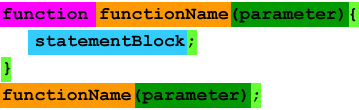
- The function declaration starts with a key word -- "function."
- The function name should be something you can remember and recognize. The best names are descriptive of what the function does.
- There can be as many parameters passed as needed. Parameters are essentially variables that are local to the function; they have no meaning outside of the function. These are generalized names that act as space holders until the real values have been passed into the function call. Using parameters allows you to tailor the way your functions behave.
- A curly brace opens the statement block.
- The statement block is where all the action is. This block of code determines how the function behaves and what it actually does. It can be as long and complex as needed. Programmers prefer to keep their functions short and focused on the task at hand. They'd rather write a bunch of simple, easy-to-maintain blocks of code, rather than one long, complex chunk. The individual statements in the statement block all finish with a semi-colon.
- A curly brace closes the statement block.
- The function call causes the code to execute.
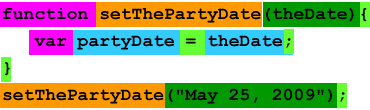
Here is an example that stores the date for a party in a variable:
Events
An "event" is when something happens. There are lots of different kinds of events. In fact, Javascript has an Event object. The Event object tracks all kinds of events.
The simplest kind to understand are user events. The user clicks on a link -- typically, this simple action triggers four distinct mouse events:
- The mouse hovers over the link.
- The user presses the mouse button down.
- The user releases the mouse button.
- The user moves their mouse off the link.
There are a lot of events that may not involve the user. For instance, the load event of the document object fires when the full page has loaded. You can listen for this event and use it to trigger a cascade of media, animations, or other wonderful user experiences.
We use "event listeners" to "listen" for an event. An event listener is attached to an object like a link or a graphic. The object is now regestered to track if the event occures.
An "event handler" is a function that is designed to respond when the event occurs. It tells your page what to do when any of those events that are being listened for occure.
Comments
Just like with HTML and CSS, commenting your code saves pain down the road. Do it often, and do it liberally! There are two convenient ways to comment code in Javascript:
//This is a single line comment! Used for short notes.
Or:
/*
This is a complex comment.
I can put as many lines in this comment as I need!
I could write a whole novel in here if I wanted to!
*/